Bounding volumes
The first thing anyone does with a loaded model is look at it, and for that the camera has to know where the model is and how big it is. A bounding volume answers both with a handful of numbers: a simple shape that is guaranteed to contain every vertex. The same shape later feeds frustum culling ("is this mesh on screen at all?") and picking ("could this ray hit this mesh?"), which is why every engine keeps one on every geometry. This step adds the two classic ones, a box and a sphere, to BufferGeometry and to the scene graph, and teaches the glTF loader to fill them in for free.
The axis-aligned box
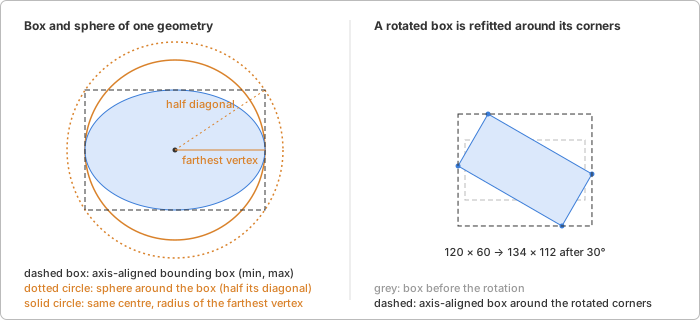
An axis-aligned bounding box (AABB) is the smallest box with sides
parallel to the coordinate axes that contains a set of points. Two
corners describe it, min and max, and computing it is one pass over
the vertices keeping the smallest and largest value per axis. The union
of two boxes is the component-wise min of the mins and max of the
maxes, also exact.
A box is empty when min > max. Box3 starts that way
(min = +∞, max = −∞), so growing it point by point needs no special
first step: the first point sets both corners.
The box's weakness is rotation. Rotate a box and its sides are no longer parallel to the axes; to get an axis-aligned box again you take the eight transformed corners and fit a new box around them. The result is never too small, but it is larger than the true extent, and it grows a little on every rotation, which is why a world-space box is refitted from the local one each time and never rotated twice in a row.
The sphere
A bounding sphere is a centre and a radius. It cannot hug a shape the way a box can, a flat or long object gets a lot of empty sphere, but it has one property a box lacks: rotation does not change it. Move the centre along with the object and the radius stays, only scale touches it. That makes it the right shape for everything that happens in world space, where objects rotate freely.
It is also what camera framing wants. A sphere of radius r fits exactly
into a vertical field of view fov from a distance of
distance = r / sin(fov / 2)
because the sphere's silhouette then touches the top and bottom edges of the view. Add ten percent for breathing room and the model fills the window whatever its size.
Where the sphere's centre and radius come from matters. The cheap answer
is the sphere around the box: the box's centre and half its diagonal.
For a cube that is exact. For anything round it is not: a sphere mesh of
radius 1 has a box of side 2 whose half diagonal is √3 ≈ 1.73, so the
camera backs off almost twice as far as necessary. The better answer costs
one more pass over the vertices: keep the box's centre, but take the
radius as the distance to the vertex farthest from it. For the sphere mesh
that gives exactly 1. It is not the smallest possible sphere (finding that
is a harder problem), but it is close, and it is what three.js does too.
Under a matrix the centre is transformed like any point. For the radius, the matrix's columns are the images of the three axis directions, so no direction is stretched by more than the longest column, and the radius is multiplied by that length. For a uniform scale that is exact; for a non-uniform one the sphere is a bit too large, never too small.
Normalized attributes
The typed attributes step allowed positions to be
stored as integers that the GPU maps to 0..1 or −1..1. A bounding box
computed from the raw integers would be off by a factor of thousands, so
BufferAttribute.getComponent() now applies the same mapping WebGL does
(divide by the type's largest value; for signed types the most negative
value clamps to −1) and the box computation reads through it.
Where glTF helps
glTF requires min and max on every position accessor, in the
accessor's own component type. The loader turns them straight into the
geometry's boundingBox, mapped through the normalization rule when the
accessor is quantized, so a loaded model has its boxes before a single
vertex was looked at. The sphere is not in the file and is computed on
first use.
In magic-pixels
const model = await loadGltf('models/helmet.glb');
const sphere = computeBoundingSphere(model.scene);
const distance = sphere.radius / Math.sin(((camera.fov / 2) * Math.PI) / 180);
camera.position.set(
sphere.center.x,
sphere.center.y,
sphere.center.z + distance
);
camera.lookAt(sphere.center);
Box3 and Sphere live next to the matrices and vectors in
src/utils/. A geometry computes and caches its own volumes in local
space with computeBoundingBox() and computeBoundingSphere(); the
cached boundingBox / boundingSphere fields are null until then, and
setting them back to null after editing positions makes the next call
recompute. For a subtree of the scene graph, computeBoundingBox
and computeBoundingSphere take an Object3D and return the
world-space volume of every mesh below it: each geometry box is
transformed by its mesh's world matrix and refitted, the boxes are
unioned; the sphere is centred on that box and grown until it contains
every mesh's transformed sphere.
Decisions worth knowing:
- The box is the primary volume. It is exact, cheap and what the file provides; the sphere is derived from it (centre) plus one pass (radius), and only where it is needed.
- World-space volumes are computed, not cached. A mesh moves every frame; caching would mean invalidation logic in the scene graph. The helpers update the subtree's world matrices themselves and cost a few matrix multiplications per mesh, not per vertex, because they transform the cached local volumes.
- Invisible meshes count. A hidden part is still part of the model's extent; filtering is the caller's job.
Where it lives:
src/utils/box3.ts,src/utils/sphere.ts: the two volumes and their operations.src/geometries/buffer-geometry.ts:getComponent()with the normalization rule, the cached volumes and theircompute*methods.src/scene/bounds.ts: the world-space helpers for a subtree.src/loaders/gltf/loader.ts: the box from the accessormin/max.
Try it
The glTF loader
demo frames every model with computeBoundingSphere(). Things to change:
- Replace the helper with
new Sphere().setFromBox(computeBoundingBox(model))and loadSuzanneorDamagedHelmet: the model shrinks in the view, by the√3from above. - Find the mesh of a freshly loaded
Boxwithtraverse()and log itsgeometry.boundingBox: it is filled from the file, whileboundingSphereis stillnull. - Drop the
1.1breathing room and turn the model: with the true radius the silhouette comes right up to the top or bottom of the window but never crosses it.
Further reading
- 3D Math Primer, chapter 9: Geometric primitives: AABBs, spheres, transforming an AABB by refitting its corners, and why neither volume is always the better one.
- three.js:
Box3andSphere: the API these classes follow, with the samesetFromObjectidea behind the helpers. - Learn OpenGL: Frustum culling: what bounding spheres are for once the camera is framed.
- Wikipedia: Bounding sphere: why the smallest enclosing sphere is a harder problem than it looks, and Ritter's cheap approximation.
- glTF 2.0 specification: accessors:
the
min/maxrule the loader relies on.