Lights
A physically based material computes how much light a surface reflects towards the camera, which is meaningless without knowing how much light arrives. This step adds the arriving part: three kinds of light source as nodes in the scene graph, and a fixed set of uniforms through which every shader can read them. The BRDF that turns arriving light into reflected light is the PBR material; here the shading is plain Lambert so the lights can be seen doing something.
Three kinds of light
Real light comes from surfaces of every shape and bounces around a room many times before it reaches the eye. Real-time renderers replace that with a few idealised sources, each described by a handful of numbers:
- Ambient light is a constant colour added to every surface regardless of orientation, a stand-in for all the bounced light there is no time to simulate. It has no position and no direction.
- A directional light is a source so far away that all its rays are parallel: the sun. It has a direction and a colour, and it is equally strong everywhere in the scene.
- A point light radiates from one position in all directions: a light bulb. It has a position and a colour, and it gets weaker with distance.
glTF's KHR_lights_punctual extension defines exactly the last two (plus a
spot light, a point light restricted to a cone, which is left for later),
and calls them punctual because each is a single point or direction with
no size. That is also why they can give perfectly sharp highlights and
shadows; area lights are a later refinement.
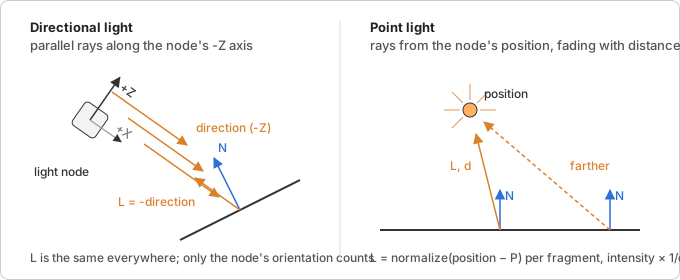
What a surface receives
For every fragment the shader needs two things per light: the direction
towards the light, L, and how much light arrives. Both depend on the
kind of light.
Directional. L is the same for every fragment: the negated light
direction. The arriving light is just the light's colour.
Point. L runs from the fragment position P to the light position,
L = normalize(lightPosition − P), so it differs per fragment. The
arriving light falls off with distance: the light's energy spreads over a
sphere whose surface grows with 4πd², so a fragment at distance d
receives 1/d² of it. This inverse-square law is why point light
intensities are large numbers (a bulb a few units away needs an intensity
of five or ten to look like anything). It never reaches zero, which makes
it impossible to say where a light stops mattering, so glTF adds an
optional range and windows the falloff to zero there:
attenuation = clamp(1 − (d / range)⁴, 0, 1) / d²
The fourth power keeps the window flat until close to the range and then drops smoothly, so the cutoff does not show as an edge.
Lambert's cosine law. How much of the arriving light a surface
actually catches depends on the angle at which it arrives. A beam hitting
a surface head-on covers a small patch; the same beam at a grazing angle
spreads over a larger patch, so each point of it gets less. The ratio is
the cosine of the angle between the surface normal N and L, which for
unit vectors is their dot product:
diffuse = lightColor · max(dot(N, L), 0)
The max clamps away surfaces facing away from the light; a negative
cosine would mean light arriving from behind the surface. This one product
is the whole of diffuse shading, and it is where every lighting model
starts.
Which coordinate space
Every vector in that equation has to be in the same space. The built-in
vertex shader already hands the fragment shader vPosition and vNormal
in view space, the camera's own coordinate system, because that is what
modelViewMatrix and normalMatrix produce. So the renderer converts
each light into view space too, once per frame, and the shader never
transforms anything:
- A directional light's direction is the node's local -Z axis in world
space. The columns of a transform matrix are the images of the basis
vectors, so the third column of
worldMatrixis where local +Z ends up; negate it for -Z. Then apply the view matrix as a rotation only (a direction has no position, its homogeneouswis 0, so the translation column does not take part) and normalise, which also removes any scale the node carried. - A point light's position is the fourth column of
worldMatrix, the translation. It is a point,w = 1, so the full view matrix applies, translation included.
Transforming a direction with the view matrix's rotation is only correct
because the view matrix has no non-uniform scale; a normal in a scaled
space would need the inverse transpose, which is what normalMatrix is
for. Cameras are not scaled, so the rotation part will do.
Colour and intensity
A light has a colour and a scalar intensity, which is easier to animate and
to read from a file than baking brightness into the colour. The shader only
ever needs their product, so the renderer premultiplies:
uniform = color × intensity. Light colours are taken as linear RGB (see
linear and sRGB color) and the
lighting math runs in linear space; the example shader encodes to sRGB at
the end with pow(color, 1/2.2).
In magic-pixels
Light extends Object3D with a color and an intensity;
AmbientLight, DirectionalLight and PointLight (with
a range, 0 for none) are the three kinds. Being nodes, lights are
positioned, parented, animated and hidden like meshes, and
prepareScene() collects the visible ones into frame.lights in tree
order. A DirectionalLight shines along its -Z axis, the same axis a
camera looks along, so light.lookAt(target) aims it and a glTF light node
maps onto it without any conversion.
The renderer fills the light uniforms a shader declares, next to the matrix uniforms and under the same rule (a material uniform of the same name wins):
| Uniform | Type | Value |
|---|---|---|
ambientLightColor |
vec3 |
sum of all ambient lights, colour × intensity |
directionalLightDirections[] |
vec3[] |
direction each light shines in, view space |
directionalLightColors[] |
vec3[] |
colour × intensity |
directionalLightCount |
int |
how many entries are filled |
pointLightPositions[] |
vec3[] |
position in view space |
pointLightColors[] |
vec3[] |
colour × intensity |
pointLightRanges[] |
float[] |
range, 0 for no cutoff |
pointLightCount |
int |
how many entries are filled |
Two decisions worth knowing. The directional uniform is the direction the
light shines in, as in glTF and the Khronos sample viewer, so a shader
negates it to get L (three.js stores the opposite). And GLSL uniform
arrays have a compile-time size, so the shader declares how many lights it
can take (#define MAX_POINT_LIGHTS 4 and arrays of that size) and the
renderer fits the frame's lights to it: unused entries are zero, lights
beyond the size are dropped, and the count is clamped to the shortest
declared array so a loop over it never reads past the end.
Where it lives:
src/scene/light.ts: the four classes.src/scene/renderer.ts:prepareScene()collects lights intoFrame.lights;NullRendererrecords them aslastFrame.lights.src/webgl/light-uniforms.ts: LightUniforms and the per-frame view-space conversion.src/webgl/webgl2-renderer.ts: uploads the arrays a shader declares, fitted and clamped, through the existing skip-if-unchanged path.src/test-utils/fake-webgl2.ts: array sizes may now be#defined names, so shaders in tests can be written like real ones.
Try it
Lights renders a few objects under a circling directional light and an orbiting point light, with a small unlit sphere parented to the point light so you can see where it is. The whole shading is the Lambert loop above, in a fragment shader in the page. Things to change:
- Set the point light's
rangeto3and watch the falloff window cut it off before it reaches the far objects. - Drop the
-invec3 L = -directionalLightDirections[i]to see the light come from the wrong side. - Give
ambientLightColora strong colour and notice that it flattens everything: ambient light has no direction, so it cannot show shape. - Replace
max(dot(N, L), 0.0)withdot(N, L) * 0.5 + 0.5for the "half Lambert" wrap that some stylised renderers use.
Further reading
- WebGL2 Fundamentals: Directional lighting
and Point lighting:
the dot product, the normal matrix and the per-fragment
L, built up in raw WebGL. - Learn OpenGL: Basic lighting and Light casters: ambient, diffuse and specular, then directional, point and spot lights with their attenuation.
- Scratchapixel: Lambert's cosine law: why the cosine, derived from the area a beam covers.
- glTF: KHR_lights_punctual:
the light types, their units, the
rangewindow, and the -Z convention the loader will map onto these classes. - Filament: Lighting, punctual lights: the inverse-square law and the smooth range window, with the reasons for each.
- 3D Math Primer, chapter 4: Introduction to matrices: why the columns of a matrix are the transformed basis vectors, the fact the -Z extraction relies on.