PBR material
The lights step computed how much light arrives at a
surface. This step answers the other half of the question: how much of it
leaves towards the camera. The function that answers it is the BRDF (see
Rendering concepts), and the glTF
metallic-roughness material is a particular BRDF plus a set of textures
that feed it. createPbrMaterial() is that material: the shader every glTF
model will be drawn with, and the first built-in lit material.
What the surface is made of
A surface is described by a handful of numbers per texel:
- Base colour (RGBA, linear): the colour of the diffuse reflection of a dielectric, or the colour of the specular reflection of a metal.
- Metallic (0 or 1): a dielectric or a metal. The two reflect light in completely different ways, so this one number switches between them.
- Roughness (0..1): how bumpy the surface is at a scale far below a texel. Smooth surfaces mirror, rough surfaces blur.
- Normal, occlusion and emissive maps: a per-texel normal for small bumps, a per-texel darkening of the ambient light, and light the surface gives off itself.
Everything the BRDF needs is derived from the first three:
cDiff = baseColor · (1 − metallic)
f0 = mix(0.04, baseColor, metallic)
α = roughness²
cDiff is the diffuse colour: metals have none (light does not enter
metal, it bounces off or is absorbed). f0 is the reflectance when looking
straight at the surface: for every dielectric it is about 4%, without any
tint, which is why plastic and skin and wood all have white highlights; for
a metal it is the base colour itself, which is why gold highlights are
gold. And α, the roughness squared, is the "perceptually linear"
remapping glTF specifies: it makes equal steps of the roughness slider look
like equal steps of blur.
The BRDF
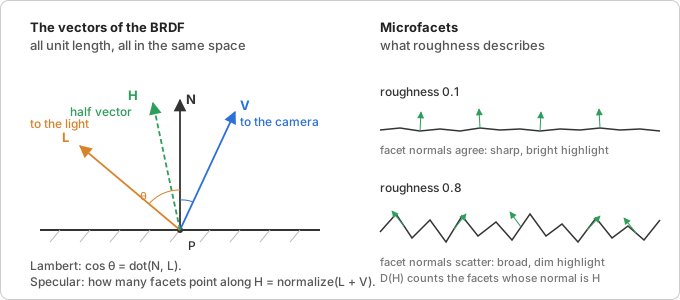
For every light, the shader has the four unit vectors of the figure: N,
L (towards the light), V (towards the camera) and the half vector
H = normalize(L + V). The reflected light is a sum of two terms, weighted
by Lambert's cosine as in the previous step:
color += (diffuse + specular) · lightColor · max(dot(N, L), 0)
Diffuse is the Lambert term from the lights step, in the diffuse colour, and dimmed by whatever the specular term reflected first (light that bounced off the surface did not enter it):
diffuse = (1 − F) · cDiff
Specular is the Cook-Torrance microfacet model. The idea: a rough
surface is made of countless tiny mirrors (microfacets), each perfectly
smooth but pointing in a slightly different direction. Only the facets
whose normal happens to be H reflect light from L exactly into V. So
the specular term asks three questions and multiplies the answers:
specular = F · D · Vis
-
D, the normal distribution: what fraction of the facets point along
H? This is where roughness enters. glTF uses the GGX (Trowbridge-Reitz) distribution:D = α² / (π · (dot(N, H)² · (α² − 1) + 1)²)For a smooth surface (small
α) it is a tall, narrow spike arounddot(N, H) = 1: a small, bright highlight. For a rough one it is low and wide: the highlight spreads across the surface and dims. GGX in particular has a long tail, which is why real highlights fade out softly instead of ending at an edge. -
Vis, the visibility (or geometry) term: of the facets that point the right way, how many are hidden by their neighbours? Bumps shadow each other, from the light's side (shadowing) and from the camera's side (masking), and the rougher the surface and the more grazing the angle, the more is lost. The Smith model with GGX facets gives the height correlated form
Vis = 0.5 / (dot(N, L) · sqrt(dot(N, V)² · (1 − α²) + α²)
+ dot(N, V) · sqrt(dot(N, L)² · (1 − α²) + α²))which already includes the
1 / (4 · dot(N, L) · dot(N, V))that the microfacet model's derivation puts under the whole product. That is why it is calledVisrather thanG. -
F, the Fresnel term: how much does a single facet reflect? Every surface reflects more at grazing angles; a lake is transparent from above and a mirror from the shore. Schlick's approximation rises from
f0head-on to full reflection at 90°:F = f0 + (1 − f0) · (1 − dot(V, H))⁵Fis a colour, becausef0is, and it is the sameFthat dims the diffuse term above. This one line is what makes metals look like metal: theirf0is their base colour, and everything they reflect is tinted by it.
That is the entire lighting model. There are no shininess exponents and no specular colours to tune; roughness and metallic are the only knobs, and both mean something you could measure.
Where the π went
The specification's BRDF has a 1/π in the diffuse term (cDiff / π)
and one inside D. They are there so that a surface never reflects more
energy than it receives: the Lambert BRDF integrated over the hemisphere
comes out as exactly cDiff. The magic-pixels shader leaves both out.
That is the same as multiplying every light's intensity by π, and it means
a light of intensity 1 makes a white diffuse surface facing it exactly
white, which is what the lights page assumed and what makes
intensities easy to pick. The glTF loader will divide the intensities of
KHR_lights_punctual lights by π when it maps them, so files render as
the specification intends.
Ambient light, occlusion and emission
An ambient light has no direction, so the BRDF above cannot be applied to
it; it stands for a uniform environment shining from everywhere. Such an
environment reflects diffusely with cDiff, and specularly with roughly
f0, the average reflectance, so the shader adds:
color += ambientLightColor · (cDiff + f0) · occlusion
This is the crude stand-in for image-based lighting, which would integrate the BRDF over a real environment map and is a later milestone. The occlusion map only darkens this term: a crevice is hidden from the environment, but not from a light that shines straight into it. Emission is added last, after all lighting, because it is light the surface makes itself.
Normal mapping
A normal map stores normals in tangent space: x along the direction
in which the texture's u grows across the surface, y towards the top
of the image (towards v = 0, since the first image row is v = 0), z
along the surface normal. To use
the sampled normal the shader needs those three axes in view space, the
TBN matrix, and multiplies:
n = normalize(mat3(T, B, N) · (texel · 2 − 1))
N is the interpolated vertex normal. T, the tangent, either comes from
a tangent attribute (glTF stores one per vertex, with the handedness of
B in its w), or the shader reconstructs it from how the texture
coordinates change between neighbouring pixels: dFdx and dFdy give
the change of position and of uv across one screen pixel, and solving
dp = T · du + B · dv for T yields the direction of growing u. B is
then cross(N, T), times w if there is one.
Output
All of the above happens in linear light. The last line encodes the
result for the sRGB display, with the exact transfer curve (a linear
segment near black, a 1/2.4 power above) rather than the pow(1/2.2)
approximation of the earlier examples. The alpha handling depends on the
material's alpha mode: OPAQUE writes 1, MASK discards fragments below
the cutoff and writes 1, BLEND writes the base colour's alpha and lets
the render state from the material render state
step composite it.
The conversion is the one thing a scene drawn into a render target must not
do: a later pass converts once, after tone mapping. The linearOutput option
skips it; see Tone mapping.
In magic-pixels
createPbrMaterial(options) returns an ordinary Material whose
sources are src/shaders/pbr.vert and pbr.frag. Every option is a glTF
material property of the same name: the factors become uniforms
(baseColorFactor, metallicFactor, roughnessFactor, emissiveFactor,
normalScale, occlusionStrength, alphaCutoff) that can be changed
at any time; the maps (baseColorMap, metallicRoughnessMap,
normalMap, occlusionMap, emissiveMap) are Texture uniforms,
each optionally with the texture coordinate set to sample (uv or uv1,
see PbrMap). alphaMode and doubleSided set transparent and
side; unlit gives the KHR_materials_unlit variant, base colour (factor, map and
vertex colours) with no lighting, the way to show baked-in lighting;
linearOutput writes the linear colour without the sRGB conversion, for
rendering into a float render target.
The material reads the lights through the built-in light uniforms of the
previous step. See PbrMaterialOptions for the whole list.
Two decisions worth knowing:
- Map presence is decided at creation, not per draw. A GLSL sampler
with no texture bound reads texture unit 0, whatever happens to be there,
so "no normal map" cannot be a uniform.
createPbrMaterial()inserts a block of#defines after the#versionline (HAS_NORMAL_MAP,NORMAL_UV vUv1,HAS_TANGENT,ALPHA_MASK, ...) and the shader compiles only the code for the maps and attributes that exist. Adding a map means creating a new material. - Programs are cached by source. Materials with the same defines produce byte-identical sources, so the renderer now keys its program cache by the source pair and shares one program between them, keeping one uniform state cache per program. A model with forty materials that all use a base colour map compiles one program, not forty.
Where it lives:
src/shaders/pbr.vert: hands position, normal,uv, and optionallyuv1,colorandtangentto the fragment shader in view space.src/shaders/pbr.frag: the BRDF above, the normal mapping, the ambient and emissive terms and the sRGB output.src/scene/material.ts:createPbrMaterial(), PbrMaterialOptions and PbrMap; the option to define mapping and the uniforms.src/scene/constants.ts: the AlphaMode string union.src/webgl/webgl2-renderer.ts: the program cache keyed by shader source, with the uniform state moved next to the program.
Try it
PBR material renders a grid of spheres, roughness from left to right and metalness from front to back, on a floor with a generated checker base colour map and a normal map that uses the derivative tangent frame, under a circling sun and an orbiting point light. Things to change:
- Set every sphere's
metallicFactorto 1 and remove the ambient light: metals reflect nothing but the lights, so they go black between the highlights. That is the gap image-based lighting will fill. - Replace
cDiff · (1 − F)with plaincDiffin the shader and look at the smooth spheres at a grazing angle: they get brighter than the light allows, because the specular and diffuse terms now both count the same light. - Set
normalScaleof the floor to-1to turn the bumps into dents, or to3to see why exaggerated normal maps look wrong: the normals lean further than any real bump could. - Give the floor
alphaMode: 'mask'and a base colour map with holes in its alpha channel.
Further reading
- glTF specification, appendix B: BRDF implementation: the exact model this shader implements, term by term, with the same names.
- Khronos glTF sample viewer:
brdf.glslandpbr.frag: the reference implementationpbr.fragfollows. - Learn OpenGL: PBR theory and PBR lighting: the microfacet model, energy conservation and each of D, G and F with pictures, then the same shader written from scratch.
- Filament: Physically based rendering: the derivations behind the terms, the height-correlated Smith visibility function, and the roughness remapping.
- Naty Hoffman: Physics and math of shading: the SIGGRAPH course notes that most real-time PBR builds on.
- Christian Schüler: Followup: Normal mapping without precomputed tangents: the screen-space derivative tangent frame.
- Learn OpenGL: Normal mapping: tangent space, the TBN matrix and why tangents are needed.
- Wikipedia: sRGB: the exact transfer function the output step uses.