Loader core
Six steps built the pieces a glTF file needs: quaternions for the node
rotations, typed attributes for the vertex data, sRGB textures, render
state, lights and the PBR material. This step is the loader that connects
them. There is little new theory in it; what it teaches is how a glTF
file is put together, which is worth knowing whether you write a loader or
only use one. loadGltf(url) fetches a .gltf or .glb and returns a
Scene ready to render, plus everything else the file contained.
The file is a database
The overview listed the arrays a glTF document consists of. What makes it a database rather than a tree is that they only reference each other by index. Following the references from the top down:
scene ─▶ nodes ─▶ mesh ─▶ primitives ─▶ accessor ─▶ bufferView ─▶ buffer
│ (and indices) │
├─▶ camera └─▶ byte range, stride
└─▶ material ─▶ texture ─▶ image, sampler
Nothing is nested, nothing is duplicated: ten nodes can share one mesh,
two textures can share one image, and every primitive of a model can
point into the same buffer. A loader is a walk over these references that
creates one object per entry and reuses it wherever the index shows up
again. That is exactly what the caches in the loader do, and why
result.nodes[7] is the same object as the seventh node's place in the
tree.
From bytes to attributes
The data of a model, positions, normals, texture coordinates, indices,
lives in buffers: opaque byte arrays, one per .bin file, data URI or
the binary chunk of a .glb. Two layers of metadata describe how to read
them.
A buffer view is a byte range in a buffer, byteOffset and
byteLength, optionally with a byteStride: the distance from the start
of one element to the start of the next. Without a stride, elements are
packed back to back.
An accessor is a typed view into a buffer view: a componentType
(byte, short, int, float, signed or not; the same values WebGL uses), a
type (SCALAR, VEC2, VEC3, VEC4, MAT4, ...), a count, its own
byteOffset inside the buffer view and a normalized flag. Component c
of element i sits at
address = bufferView.byteOffset + accessor.byteOffset + i · stride + c · componentSize
stride = bufferView.byteStride ?? componentCount · componentSize
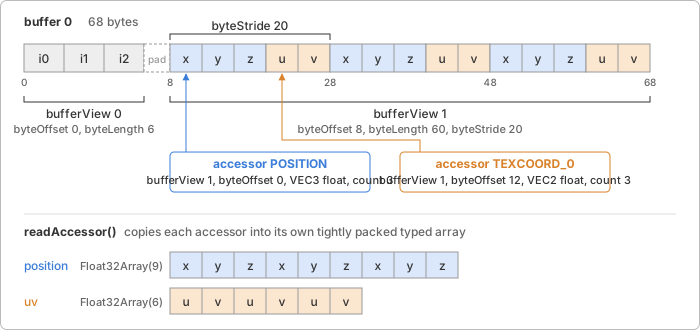
The stride is what allows interleaving: storing the position, normal and
UV of one vertex next to each other, then the next vertex, which is how
GPUs like to read vertex data. A BufferAttribute holds one array
per attribute, so the loader de-interleaves: it walks the elements with
the stride and copies each into a tightly packed typed array of the
accessor's component type. The result is always a copy, even when the
source was already packed. Copying costs one pass over the data, once, and
in exchange the loader never has to care whether a float accessor happens
to start on a 4 byte boundary (typed arrays refuse to be created on
unaligned offsets), and a .glb's binary chunk can be garbage collected
after loading.
The typed array constructor is looked up from the component type, so the
typed attributes step carries a quantized file
(Int16 positions, Uint8 UVs) through unchanged; normalized is passed
along. Index accessors are read the same way; 8 bit indices are widened
to 16 because BufferGeometry keeps 16 or 32 bit indices.
Sparse accessors describe an array as a base plus a list of
exceptions: sparse.indices names the elements to replace and
sparse.values supplies their values. A morph target that moves a few
vertices out of thousands stores only those. The base may even be omitted,
meaning all zeros. The loader reads the base (or allocates zeros), then
overwrites the listed elements.
The GLB container
A .gltf file is JSON with its buffers and images beside it as separate
files or embedded as data URIs (base64 makes them a third larger). A
.glb packs everything into one binary file:
offset size content
0 4 magic 'glTF' (0x46546C67, little endian)
4 4 version (2)
8 4 total length
12 4 length of the JSON chunk
16 4 chunk type 0x4E4F534A ('JSON')
20 n the JSON, padded with spaces to a multiple of 4 bytes
... 4 length of the binary chunk
... 4 chunk type 0x004E4942 ('BIN')
... m the buffer, padded with zeros to a multiple of 4 bytes
The JSON inside is an ordinary glTF document whose first buffer has no
uri: it means "the binary chunk". The loader reads the chunk as a view
into the file bytes, not a copy; the accessor copies above are the only
copies made.
Nodes
A node is an Object3D. Its transform comes in one of two forms.
Most files use translation, rotation (a quaternion, [x, y, z, w]) and
scale, which go straight into position, quaternion and scale; this
is why the quaternions step came first. A node may
instead carry a 16 value column-major matrix, and then the loader writes
it into localMatrix and turns matrixAutoUpdate off. Decomposing such a
matrix into three vectors is possible for most files but loses shear, and
the file did not give three vectors; keeping what it gave is the honest
choice. The scene graph
page describes both modes.
What kind of object a node becomes depends on what it references. A node
with a single-primitive mesh is the Mesh; a node with a camera
is the Camera; a node with a KHR_lights_punctual light is the
Light. A node with several things, a mesh of several primitives, or
a camera and a light at once, becomes a plain Object3D with the
parts as children, so each part keeps a single transform of its own. Node
names are kept in Object3D.name, a field added by this step; the parts
of a multi-primitive mesh carry the mesh's name.
Meshes and primitives
A glTF mesh is a list of primitives, each with its own attributes, indices, draw mode and material. One primitive becomes one Mesh with one BufferGeometry, because a magic-pixels mesh has one material. Nodes that instance the same glTF mesh share the geometries and materials, so a model with a hundred copies of one bolt uploads its vertices once.
Attribute names are translated from glTF semantics to the names the
built-in shaders use: POSITION to position, NORMAL to normal,
TANGENT to tangent, TEXCOORD_0 and TEXCOORD_1 to uv and uv1,
COLOR_0 to color. JOINTS_0 and WEIGHTS_0 are stored as joints
and weights for a later skinning step; anything else keeps its semantic
in lower case.
A primitive may omit normals, and the specification says what to do then: compute flat normals, one per triangle, so that each face is a plane of uniform shading. That is not a per-vertex operation. A vertex shared by two triangles would need two different normals, so the loader first expands an indexed geometry into one vertex per index (three per triangle, duplicating shared ones), then assigns each triangle's normal, the normalized cross product of two of its edges, to its three vertices. Points and lines without normals cannot be lit at all and are given the unlit variant of their material.
Materials, textures and images
Every property of a glTF material maps onto an option of
createPbrMaterial() from the PBR material step by
the same name; baseColorTexture becomes baseColorMap and so on, with
the texCoord of each texture reference picking uv or uv1.
KHR_materials_unlit sets unlit, KHR_materials_emissive_strength
multiplies into emissiveFactor. A primitive with no material gets the
specification's default: white, fully metallic, fully rough.
Two things about textures follow from earlier steps. First, colour space
is a property of the slot, not the image: base colour and emissive maps
are sRGB, everything else is linear data (see
Texture extensions). A file may use the same
glTF texture in both kinds of slot, so the loader creates one
Texture per glTF texture and colour space, sharing the decoded
image between them. Second, because map presence and vertex attributes are
#defines in the shader, "the material" is really "the material as used
with these attributes": a glTF material drawn once with vertex colours and
once without yields two Material objects with different sources.
The loader caches by glTF material, draw mode, vertex colours and
tangents, and result.materials lists every variant.
Samplers map onto Filter and Wrapping by their GL enum
values, with the glTF defaults of repeat wrapping and linear filtering
with mipmaps where a file leaves them out. Images come from three places,
a relative or absolute uri, a data URI, or a byte range in a buffer with
a mimeType, and all three end up in createImageBitmap. The loader asks
it for premultiplyAlpha: 'none', because the blend function of the
render state step expects straight alpha,
and colorSpaceConversion: 'none', because decoding sRGB is the GPU's job
and the browser's colour management would otherwise do it twice.
Cameras and lights
A perspective camera gives yfov in radians, an optional aspectRatio,
znear and an optional zfar (absent means an infinite projection, which
becomes the PerspectiveCamera default far plane). An orthographic
one gives xmag and ymag, the half extents of the view volume, which
become left = -xmag, right = xmag, top = ymag, bottom = -ymag.
KHR_lights_punctual lights are the three types of the
lights step plus spot lights, which magic-pixels does not
have yet; a spot light is loaded as a point light and a warning says so.
Intensities are divided by π: the PBR shader leaves the 1/π of the
BRDF out (see where the π went), so
a light of intensity I in the file must arrive as I/π for the file to
render as its author saw it.
Extensions
A file lists the extensions it uses in extensionsUsed and the subset it
cannot be rendered without in extensionsRequired. The loader supports
KHR_lights_punctual, KHR_materials_unlit,
KHR_materials_emissive_strength, KHR_mesh_quantization (which is free,
see typed attributes), and the two mesh
compression extensions covered in Compression,
EXT_meshopt_compression and KHR_draco_mesh_compression (both need a
decoder passed in as an option; a file that uses one without the matching
option throws naming it). A required extension outside that list is an
error before any data is read; an unsupported optional one,
KHR_texture_transform for instance, is a console.warn and the file
loads without it. Animations, skins and morph targets are read past with
a warning; they are the next milestone.
In magic-pixels
import { loadGltf } from 'magic-pixels';
const model = await loadGltf('models/helmet.glb');
scene.add(model.scene);
model.lights; // KHR_lights_punctual lights, already in the tree
model.cameras; // cameras, already in the tree
model.nodes[3].name; // every node, by glTF index
loadGltf(url, options) fetches and hands over to
parseGltf(data, options), which accepts the bytes of a .glb, the text
or bytes of a .gltf, or its parsed JSON. Both return a GltfResult:
the default scene, all scenes, nodes, cameras, lights,
materials, textures and the raw json. The GltfLoaderOptions
are baseUrl (what relative URIs resolve against; loadGltf uses the
file's URL), fetch and loadImage.
Decisions worth knowing:
- The loader is pure parsing. It touches no GPU and creates only the plain scene objects of the earlier chapters; the renderer meets a loaded model the way it meets a hand-built one. This is also why it can be tested in Node through NullRenderer.
- I/O is injectable.
fetchandloadImageare options with browser defaults. Tests pass stubs; the example passes afetchthat answers from droppedFileobjects, so a model loads from memory without a server. - Copies, not views. Accessors are copied into fresh arrays (see above), the price of never worrying about stride or alignment.
Where it lives:
src/loaders/gltf/types.ts: typings for the glTF JSON the loader reads.src/loaders/gltf/glb.ts: the container parser,parseGlb().src/loaders/gltf/accessors.ts: buffer views, accessors and sparse substitution into typed arrays and BufferAttributes.src/loaders/gltf/loader.ts:loadGltf(),parseGltf(), URI resolution, and the parser that builds materials, textures, nodes, cameras and lights.src/loaders/gltf/fixtures/: a small builder that assembles documents and binary buffers for the tests.src/scene/object3d.ts: the newnamefield.
Try it
glTF loader
loads the Khronos sample models, from the one-mesh Box to
DamagedHelmet with every map, NormalTangentMirrorTest with tangents,
AlphaBlendModeTest for the alpha modes and Sponza for a multi-file
.gltf with dozens of textures. It frames the model from its bounding box
and lets you drop your own files. Things to change:
- Load
BoxInterleaved: it is theBoxwith positions and normals in one strided buffer view, and renders identically. Log the accessor'sbyteStridefromresult.json. - Untick the demo lights while
Lanternis loaded: it has no lights of its own, but a strong emissive map, so the lamp stays lit. - Give a loaded mesh a new material:
model.nodes[0].material = createNormalMaterial()shows whether the flat normals came out right. - Export a model from Blender with and without normals and compare the vertex counts the status line reports.
Further reading
- glTF 2.0 specification: the sections on binary data (buffers, buffer views, accessors, sparse accessors and alignment), nodes, meshes (including the flat normal rule) and the GLB container.
- glTF tutorial: "A minimal glTF file" and "Buffers, BufferViews and Accessors" walk the byte layout with pictures.
- glTF 2.0 reference guide: the whole format on two pages.
- KHR_lights_punctual, KHR_materials_unlit, KHR_materials_emissive_strength: the supported extensions.
- three.js: GLTFLoader source: the same walk in a loader that keeps interleaved buffers and handles every extension.
- MDN:
createImageBitmapand Data URLs: the two browser features the image path relies on. - MDN: Typed arrays: buffers, views and the alignment rule that makes the loader copy.